If you need to reactivate an archived class—whether to reuse it, allow students to access it again, or resume teaching—you can restore it at any time. Restoring a class brings it back to the active Classrooms homepage for both teachers and students.
Follow these steps to restore your archived class:
- Go to classroom.google.com and sign in with your Google Workspace account.
- In the top-left corner of the screen, click the Menu icon (three horizontal lines/hamburger menu).
- Scroll down the menu and click on Archived classes.
- On the Archived classes page, find the class card you want to restore.
- On the class card, click the More icon (three vertical dots) in the bottom-right corner.
- Click Restore from the dropdown menu.
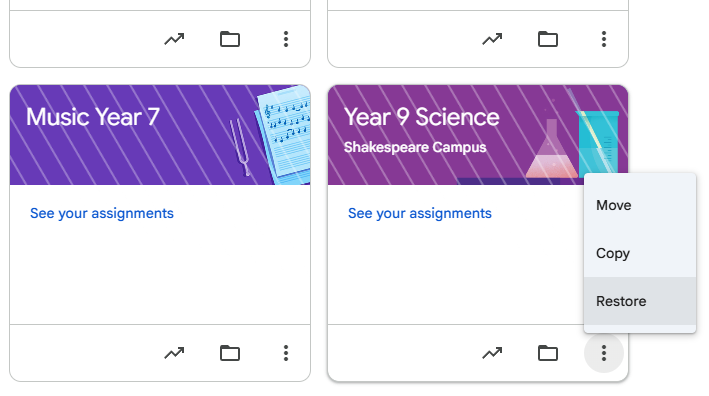
Once a class is restored, the class card will reappear on your active Google Classroom homepage and on the homepages of all enrolled students. All posts, assignments, announcements, and comments are restored and become interactive again.
Was this article helpful?
That’s Great!
Thank you for your feedback
Sorry! We couldn't be helpful
Thank you for your feedback
Feedback sent
We appreciate your effort and will try to fix the article