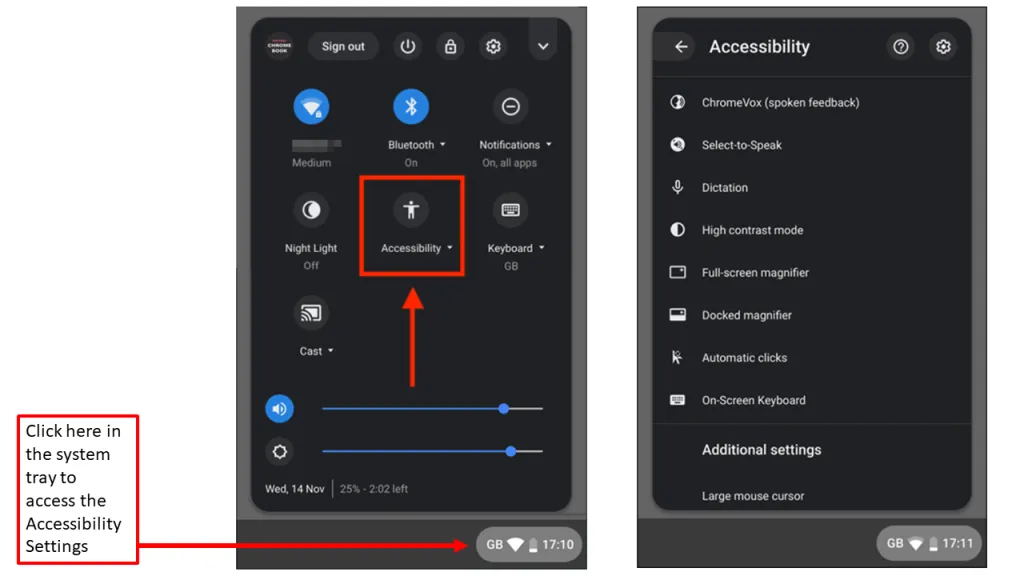
If a students Chromebook is displaying the incorrect colours, reading all text out loud or zoomed in too much, then the Chromebook may have Accessibility settings turned on. Find below a guide to disable these settings.
Wrong colours, zoomed in too much - Accessibility settings
Step 1: Click the the system tray in the bottom right corner and click Accessibility.
Step 2: Deselect all of the options on the menu
Need More Help?
If you’re still having trouble, please contact the IT Support Team:
itsupport@crestwood.hants.sch.uk
Was this article helpful?
That’s Great!
Thank you for your feedback
Sorry! We couldn't be helpful
Thank you for your feedback
Feedback sent
We appreciate your effort and will try to fix the article